Same sounds don't play at the same time

UncleCrunchUncleCrunch Mayonnaise land Join Date: 2005-02-16 Member: 41365Members, Reinforced - Onos
edited October 2014 in Mapping

I had a surprise to discover this.

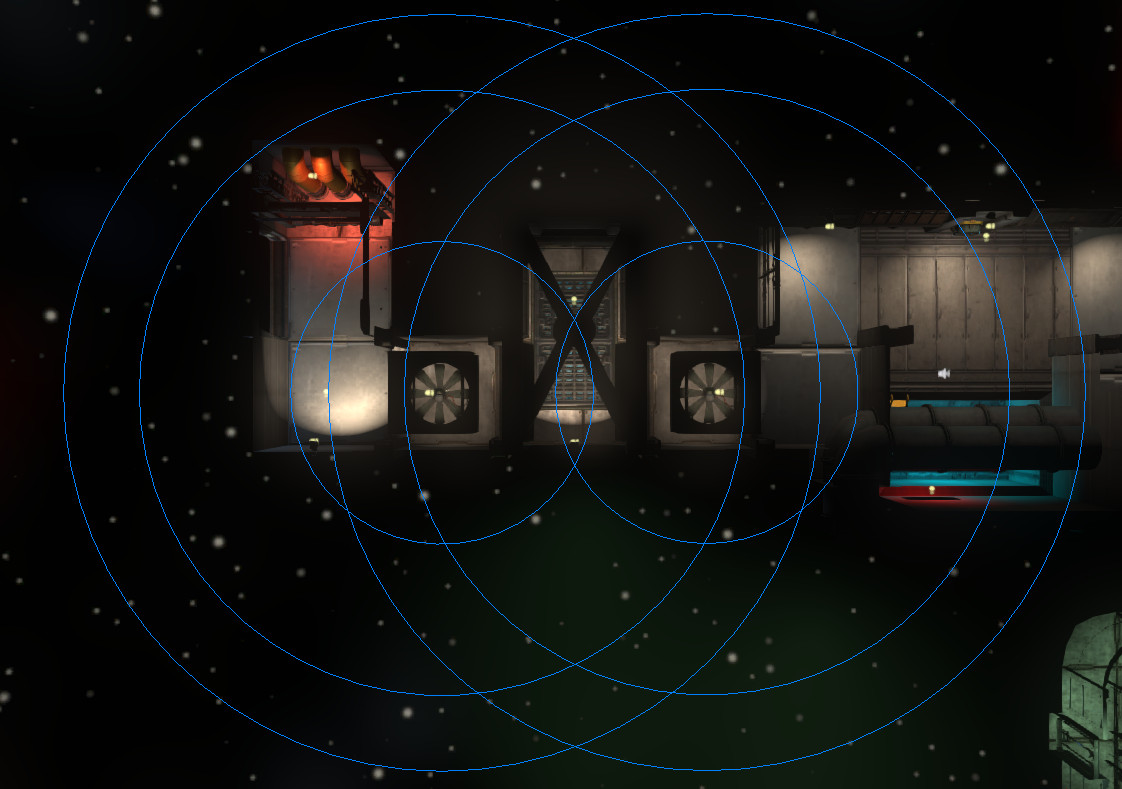
If you set up 2 ambient sounds too close to one another (Same sound to play) : One will be shut when you enter the second "trigger radius". With different sounds it works but not when it's the same.

So on this image you can end up under the fan with no sound played at full volume.
647bdc9259997a411fdfad304df289.jpg

I wont' call it a bug. But that means something isn't accurate.

Comments

  • SamusDroidSamusDroid Colorado Join Date: 2013-05-13 Member: 185219Members, Forum Moderators, NS2 Developer, NS2 Playtester, Squad Five Gold, Subnautica Playtester, NS2 Community Developer, Pistachionauts
    edited October 2014
    This is intentional according to the sound source and has been reported since over a year ago. I don't have any plans to fix it. Fixing it could have other side effects
  • AurOn2AurOn2 COOKIES! FREEDOM, AND BISCUITS! Australia Join Date: 2012-01-13 Member: 140224Members, Forum Moderators, NS2 Playtester, Forum staff
    Better the devil you know. :)
  • SamusDroidSamusDroid Colorado Join Date: 2013-05-13 Member: 185219Members, Forum Moderators, NS2 Developer, NS2 Playtester, Squad Five Gold, Subnautica Playtester, NS2 Community Developer, Pistachionauts
    I can fix some sounds if you make a list of ones like the fan one that has problems.
  • UncleCrunchUncleCrunch Mayonnaise land Join Date: 2005-02-16 Member: 41365Members, Reinforced - Onos
    It's not the sound files that are the issue. 2 different sound files will play properly.
    But when it's the same sound file on both entities; the last one activated just "cut" the 1st one.
    It would be sad to "double" every sound file for that. Doesn't seem logic.
  • SamusDroidSamusDroid Colorado Join Date: 2013-05-13 Member: 185219Members, Forum Moderators, NS2 Developer, NS2 Playtester, Squad Five Gold, Subnautica Playtester, NS2 Community Developer, Pistachionauts
    It's not the sound files that are the issue. 2 different sound files will play properly.
    But when it's the same sound file on both entities; the last one activated just "cut" the 1st one.
    It would be sad to "double" every sound file for that. Doesn't seem logic.

    Yes it is fixable in the sound file but takes a long time to do.
Sign In or Register to comment.